




Submitted by knife on Tue, 12/16/2025 - 17:37
Set time, date and time zone
Using Time and Date Manager
Setting time, date and time zone of your system can be done via the Time and Date Manager.
To use this application, select the date in your panel and select Time and Date Settings...
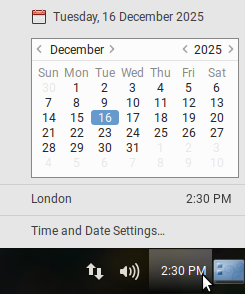
or run the following command in your terminal:
$ mate-time-adminThe Time and Date Manager will appear, where you now can adjust the following settings:
- Time and Date
- Time Zone
- NTP sync, which is explained in this documentation here.
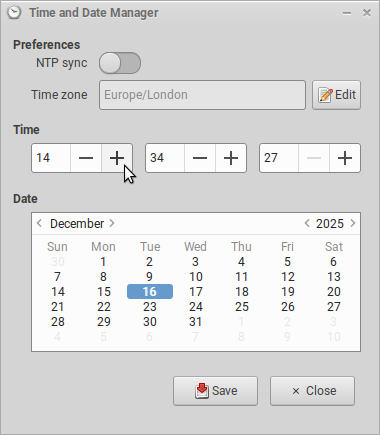
Time and Date Selection
- Time settings, by adjusting hours, minutes and seconds
- Date settings, by selecting a day in the calendar below
Time Zone Selection
By selecting Edit next to the current selected time zone, a new window will appear.
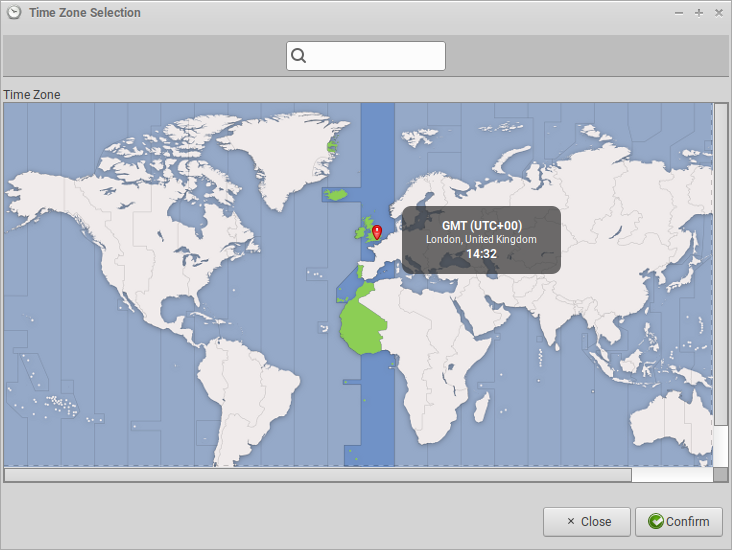
This lets you select a specific time zone from a world map. Select Confirm if you want to save your selection, or otherwise choose Close or close the window.
Further Reading
| Attachment | Size |
|---|---|
| time-and-date-manager-0.png | 27.02 KB |
| time-and-date-manager-1.png | 27.78 KB |
| time-and-date-manager-time-zone-selection.png | 178.06 KB |