




Revisión de Tasksel de Mié, 06/04/2025 - 08:42
La revisión le permite rastrear las diferencias que hay entre distintas versiones de una entrada.
Introducción a Tasksel
Tasksel es una herramienta de administración que le permite instalar y eliminar tareas en su sistema a través de un terminal. Una tarea, al igual que un metapaquete, contiene varios paquetes como una colección que se pueden seleccionar para instalar o eliminar. El hecho de que las tareas a menudo contengan muchos paquetes hace que Tasksel sea una herramienta que ahorra tiempo y una forma fácil y muy utilizada de administrar un sistema.
Tasksel está preinstalado en la edición estándar de Trisquel, pero también se puede instalar manualmente. Para instalar tasksel, abra un terminal y ejecute:
$ sudo apt install taskselEn esta documentación se tratan los siguientes temas:
Using Tasksel
To use Tasksel, open a terminal and run:
$ sudo taskselRoot privileges are necessary to apply changes but if you just want to take a look at what tasks are installed on your system root privileges aren't necessary. The default tasks of Trisquel are also listed in this documentation. See section 'Overview of Tasks'.
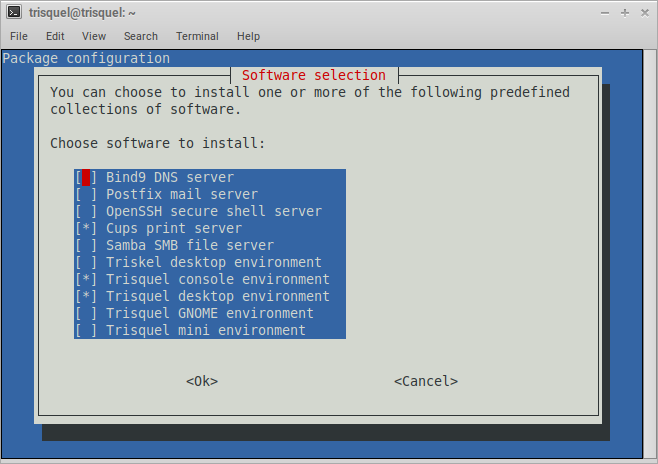
The screenshot above shows the standard configuration of Trisquel. Here, all available tasks are represented as their description and with their current status in the sense Tasksel is able to handle them; selected and un-selected tasks.
You can completely control Tasksel with a keyboard. To move around press [TAB] and to select a task press [SPACE]. To cancel or confirm your selection with the two buttons also press [SPACE].
Now, that you managed to use Tasksel, you can read the further sections of this documentation.
Overview of tasks
Here is a list of the available tasks and their description as of Trisquel 11:- dns-server (Bind9 DNS server)
- mail-server (Postfix mail server)
- openssh-server (OpenSSH secure shell server)
- print-server (Cups print server)
- samba-server (Samba SMB file server)
- triskel (Triskel desktop environment)
- trisquel-console (Trisquel console environment)
- trisquel-desktop (Trisquel desktop environment)
- trisquel-gnome (Trisquel GNOME environment)
- trisquel-mini (Trisquel mini environment)
You can get the list by running the following command in a terminal:
$ tasksel --listIf you try it for yourself you will see an 'u' or an 'i' at the beginning of each line. Tasks marked with 'i' are tasks already installed on your system and tasks marked with 'u' are tasks that are currently uninstalled.
Content of tasks
It is possible to list the included package(s) of a task with 'tasksel --task-packages [task]'. To list the packages for the task trisquel-desktop the respective command is:
$ tasksel --task-packages trisquel-desktop
How Tasksel works
If you are wondering what tasksel does when applying changes this section is for you.
If you are using Tasksel to install or uninstall a task, Tasksel will execute a command for you. If you want trisquel-desktop to be installed for example, the following command will be executed:
$ debconf-apt-progress -- apt-get -q --no-install-recommends -y install trisquel-base trisquel-base-recommended trisquel-recommended trisquel trisquel-desktop-common-recommended lightdm-gtk-greeterNote that the list of packages at the end of this command is the same as the output of 'tasksel --task-packages trisquel-desktop' like described before.
Further Reading
Read the official manual of tasksel in a terminal by running:$ man tasksel
| Adjunto | Tamaño |
|---|---|
| tasksel_commands.ods | 25.6 KB |

